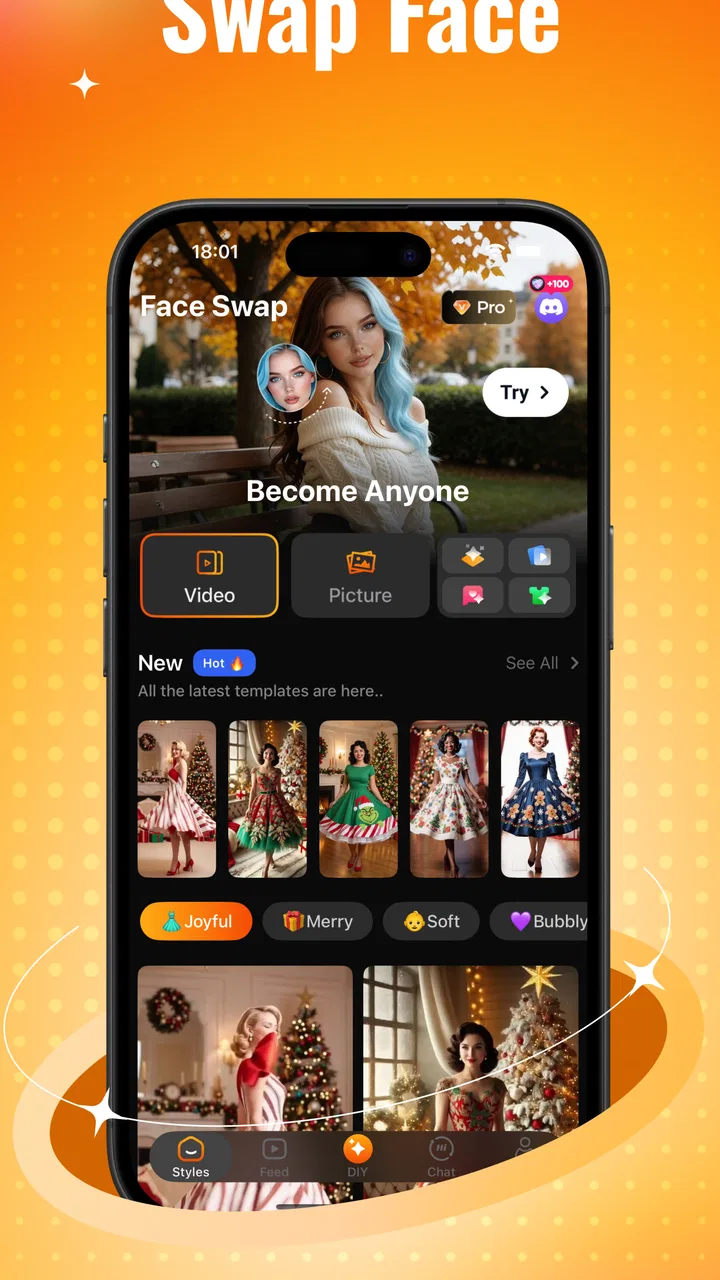
Blushy-Face Swap,AI Tool&Talk
- 2.7
- Rating
- 100.00K
- Installs
- Free
- Price

 Analysis by App-foxy
I spent my time with Blushy-Face Swap,AI Tool&Talk mainly as a playful face-swapping app, and that focus makes it easier to understand than its broad name suggests. It sits in the Art & Design category, but I would not approach it as a serious drawing suite or a professional photo editor. Its appeal is much more immediate: take a suitable portrait, experiment with a different look, and turn an ordinary image into something funny or surprising.
The app is free to install, which makes trying the basic experience fairly low-risk. It is made by BULK BROTHERS WPB LLC and is aimed at teenagers and older users. The current release is version 1.0.3, and it runs on Android 8.0 or later. That combination gives it a reasonably broad audience, although the teen content rating is important if you are considering it for younger children.
My overall reaction is mixed in a useful way. The face-swap idea is easy to understand and can produce entertaining results quickly, especially when the source image is clear and the faces are looking toward the camera. At the same time, this is not the kind of tool I would choose when I need precise retouching, dependable identity preservation, or a polished result for work. Its strongest quality is fast, casual experimentation, not professional control.
You May Also Like

 Blood Strike: 2.5 Anniversary
Blood Strike’s Loadouts Turn Every Drop Into a Tactical Gamble
A close look at Blood Strike’s custom loadouts: how fast access to signature weapons reshapes its battle royale rhythm, rewards preparation, and narrows the gap between fights.

 Pandora - Music & Podcasts
Pandora’s Music Is Easy to Start, but Harder to Recover
Pandora’s strength is its low-effort path from a seed to a station. Its weak spot is how much confidence it asks you to place in connection, setup, and quiet recovery.

 8 Ball Pool
 Is Built on Rivalries, Rematches, and Routine
A close look at the rivalries, rematches, shared routines, and unanswered safety questions that turn a quick pool match into a persistent mobile community.

 Samsung Music
’s Quiet Strength Is Playing What You Already Own
Its reach comes less from spectacle than from dependable access to a personal library. That simplicity is both the app’s strongest retention engine and its ceiling.

 AccuWeather: Weather Radar
AccuWeather Review: A Quick, Clear Forecast for Everyday Decisions
For everyday plans, the best forecast is the one you can understand quickly. AccuWeather makes rain timing, radar, and local conditions easy to act on, with a few trade-offs.

 Hill Climb Racing
Why Hill Climb Racing Still Turns Crashes Into One More Run
A tiny car, a bumpy hill and one more upgrade: Hill Climb Racing keeps resurfacing because its simple chaos makes every near-miss feel personal.
More From Our News Desk



Why the face-swap feature is the real reason to try it
The central capability is the one that gives the app its personality: changing a face in an image to create a new visual version of the scene. That can be used for harmless jokes, imaginative outfit ideas, playful profile concepts, or a quick transformation to share with friends. The result is more engaging than applying a standard color filter because the image still feels connected to a person or situation you recognize.
What I like about this approach is that it lowers the creative barrier. I do not need to understand layers, masks, blending modes, or complex editing controls before I can test an idea. Someone who normally opens a photo editor, sees a crowded toolbar, and gives up can understand the attraction here immediately. Pick an image, choose the intended transformation, inspect the outcome, and decide whether it is worth keeping.
That simplicity also defines the limits. A face swap is only convincing when the source material gives the system enough visual information to work with. A front-facing portrait with even lighting is a much better starting point than a dark group photo, a face partly hidden by hair, or a picture taken at an extreme angle. The app may still create an output from a difficult image, but a technically completed result is not always a believable one.
I found it helpful to think of the feature as a concept generator rather than a final-image machine. It is good at answering questions such as, “What would this look like?” or “Can I make this picture absurd?” It is less suitable for answering, “Can I produce a clean, publication-ready composite with exact control over every edge?” That distinction prevents disappointment and helps explain where it belongs among other creative apps.
What happens during a normal session
In everyday use, the quality of the input matters more than most first-time users expect. Before starting, I would choose one image with a clearly visible face and avoid unnecessary visual clutter. If there are several people in the frame, the intended subject should be obvious. A simple portrait is usually a better test than a busy party photograph because there are fewer competing details for the transformation to interpret.
After creating a result, I would not judge it only from the first thumbnail or preview. I would zoom in mentally, looking at the hairline, jaw, eyes, and the transition between the face and the surrounding head. Those are the areas where an amusing experiment can become visibly artificial. For a private joke, that may be perfectly acceptable. For a public post, I would be more selective and discard anything that looks distorted or misleading.
A useful workflow is to keep the original image separate from the edited version and compare them before sharing. This sounds obvious, but fast creative apps encourage impulsive posting. The original gives you a reference for whether the face still matches the lighting and pose. It also makes it easier to return to the same image later if you want to try a different idea instead of repeatedly editing an already altered file.
I would also test a few different source photos instead of assuming that one poor result represents the whole app. A straight-on selfie, a well-lit indoor portrait, and an outdoor image can behave very differently. This is one of the less obvious lessons with face-swap tools: improving the input often has a bigger effect than repeating the same transformation over and over.
Using the creative tools without losing the joke
The app also presents itself around outfit changes and conversational, playful elements, but I see those as supporting the main attraction rather than reasons to treat it like a full design workstation. The face transformation is where the visual payoff is easiest to understand. Outfit-focused experimentation can add context to a new look, while the chat-oriented side can make the experience feel more casual and entertaining than a conventional editor.
For me, the best results come from giving each experiment a clear purpose. I might create a deliberately exaggerated character, test a humorous makeover, or make a visual prompt for a costume idea. I would not begin with the expectation that the app will replace a wardrobe-planning service, a portrait retoucher, or a detailed design program. Keeping the task small makes the interface feel more useful and the imperfections less frustrating.
There is also a practical reason to avoid over-editing. A funny transformation often works because the original person or setting remains recognizable. If every element is changed, the image can lose the contrast that made the joke effective. I prefer one strong visual change over several competing ones, particularly when the finished picture is intended for a message to a friend rather than a long creative project.
Where it fits into a real day
The clearest everyday scenario is a group chat. Imagine a friend sending a portrait from a themed event or asking what they might look like with a different style. Instead of opening a complicated editor, I would use a clean photo, make one transformation, inspect the face carefully, and send the result as a clearly playful image. The whole point is the reaction and the conversation that follows, not building a permanent portfolio.
Another useful case is brainstorming before taking new photos. I could use an existing portrait to explore a broad visual direction, then use that idea to choose clothing, lighting, or a pose for a real photograph. In that role, the app acts as a quick mood-board assistant. It does not need to deliver a perfect prediction; it only needs to help me decide whether an idea is worth trying in real life.
It can also work for private creative prompts. If I want to imagine a fictional character with a different appearance, a face-swap experiment can provide a starting point for a drawing, costume, or short story. The output is not the finished artwork, but it can break the blank-page problem. That is a more thoughtful use than endlessly producing random transformations with no clear reason.
I would be careful with images of other people. Even when the intention is harmless, changing someone’s face and sharing the result can make them uncomfortable, especially if the edit suggests something embarrassing or deceptive. I would ask permission before using a friend’s portrait for anything beyond a private joke, and I would label an altered image when another viewer could mistake it for a real photograph.
What makes it different from ordinary editing apps
Traditional photo editors are usually better when I want control. They let me crop precisely, correct color, remove distractions, adjust individual areas, and refine a composition step by step. That flexibility comes with a learning curve. Blushy takes the opposite route: it emphasizes a recognizable transformation that can be attempted without mastering a long list of tools.
Dedicated face-editing apps may offer more specialized controls for skin, facial proportions, or portrait cleanup. Those alternatives are a better match when the goal is a flattering, natural-looking headshot. Blushy feels more suited to playful variation, where a slightly strange result can be part of the entertainment rather than an automatic failure.
General AI image generators are stronger when I want a completely new scene from a written idea. They can be useful for fantasy concepts, backgrounds, and imaginary settings. A face-swap app has a different advantage: it starts with a real image and keeps the transformation tied to that visual reference. I would choose Blushy when preserving the basic situation matters, and a general generator when I want to invent almost everything from scratch.
This comparison also explains why the app may feel limited to experienced editors. If I already use a desktop editor comfortably, I may prefer manual work because I can correct small flaws and decide exactly how the final image should look. The benefit here is speed and accessibility. The trade is that the app asks me to accept more of the automated result.
The friction I noticed before recommending it
The first limitation is consistency. Face-based transformations depend heavily on the photograph, and users should expect uneven outcomes rather than identical quality every time. A result that looks amusing in a close portrait may look awkward in a profile shot. This is not a reason to reject the app, but it is a reason to treat the process as experimentation instead of a guaranteed one-tap solution.
The second issue is the balance between free access and paid extras. The app is free, but its in-app purchases range from $4.99 to $149.99 per item. That is a wide span, so I would explore the free experience first and avoid assuming that every visible option belongs to the no-cost portion. Anyone who dislikes surprise spending should check each purchase screen carefully before confirming anything.
I would also keep expectations realistic about privacy and sharing. A face image is personal, and an edited portrait can carry social consequences even when it is obviously artificial to the creator. I would avoid using sensitive photos, avoid making edits that could harm someone’s reputation, and think about the audience before sending or publishing a result. The most entertaining transformation is not automatically the most appropriate one.
The rating gives me another reason to recommend a trial rather than an unconditional endorsement. The app has a 3.3 average from around 180 ratings and 8 reviews, while its install count is over 50 thousand. That suggests real interest, but also a user response that is not uniformly enthusiastic. I read that combination as a signal to test the workflow personally, particularly if I care about reliability more than novelty.
Its teen rating matters in practice too. I would not hand it to a young child without supervision simply because the interface looks playful. The age guidance is part of deciding how the app fits into a family device, a classroom activity, or a shared tablet. For teenagers, it may be a light creative outlet; for younger users, an adult should remain involved in image choices and sharing decisions.
Three habits that improve the results
- Start with one face and clear lighting. This reduces ambiguity and makes it easier to tell whether an unusual result comes from the app or from a difficult source image.
- Use the app for a single visual question. Decide whether you are testing a face, an outfit idea, or a character concept, rather than stacking every available effect at once.
- Review before sharing. Check the eyes, hairline, expression, and overall context, then make sure the recipient understands that the image was altered.
A fourth habit is to keep a small set of original photos that are suitable for experiments. I would choose images with different lighting and poses, but I would not use private or sensitive portraits just to see what happens. This gives me a repeatable way to learn which kinds of pictures work best without turning every failed attempt into a frustrating mystery.
Who will enjoy it most
I would recommend it to teenagers and adults who want quick, shareable visual jokes or a low-pressure way to explore appearance ideas. It is also a reasonable pick for someone who finds conventional design software intimidating. The app’s value is highest when the user enjoys trying several concepts, accepts that some outputs will be imperfect, and cares more about immediacy than pixel-level refinement.
It may be particularly useful for a friend who likes making playful birthday messages, themed group-chat images, or imaginative character references. The face-swap capability gives those small projects a personal anchor. Instead of choosing a generic sticker, I can create something connected to the people or situation involved, provided everyone shown is comfortable with that use.
I would skip it if my main purpose is professional portrait editing, precise compositing, or dependable results for client work. I would also choose another option if I need extensive manual adjustments, advanced typography, detailed illustration tools, or a predictable export workflow. Those needs belong more naturally to a dedicated editor than to a casual AI transformation app.
People who are uncomfortable with in-app purchasing should approach it slowly, even though installation is free. I would try the accessible parts, decide whether the results justify further spending, and treat every paid choice as optional rather than necessary. The broad purchase range makes that discipline more important for anyone sharing a device or managing a family budget.
My recommendation after using it
Blushy works best when I treat it as a playful visual sandbox. Its face-swapping focus can turn a familiar portrait into a quick joke, a rough style reference, or a starting point for a more creative idea. It is easy to understand, flexible enough for casual scenarios, and more approachable than a conventional editor for users who want an immediate result.
Still, I would not confuse accessibility with precision. Source-photo quality has a major effect on the outcome, automated edits can look unnatural, and paid options require attention. The teen rating and the social sensitivity of face manipulation also mean that responsible sharing is part of using the app well, not an afterthought.
With those boundaries in mind, I think the free download is worth trying for the right audience. I would recommend it to someone who wants to experiment, laugh with friends, or visualize a playful makeover without learning a complicated design program. I would point a professional or detail-focused editor elsewhere. If your priority is quick creative fun rather than flawless control, this app earns a place on your shortlist.
FAQs for Blushy-Face Swap,AI Tool&Talk
01What is Blushy-Face Swap, AI Tool & Talk used for?
Blushy-Face Swap, AI Tool & Talk is an innovative app designed for users who want to swap faces in photos and videos with ease. Utilizing advanced AI technology, it offers seamless face swaps and additional features like AI-powered editing tools, making it perfect for creating fun and unique content.
02Is Blushy-Face Swap, AI Tool & Talk safe to use?
Yes, Blushy-Face Swap, AI Tool & Talk prioritizes user privacy and safety. It employs secure processing to ensure your photos and videos are handled with care. The app does not store your data on its servers, providing an added layer of security for its users.
03What platforms are supported by Blushy-Face Swap, AI Tool & Talk?
Blushy-Face Swap, AI Tool & Talk is available for both Android and iOS devices. This ensures that users across different platforms can enjoy its features without any compatibility issues. You can download it from the Google Play Store or the Apple App Store.
04Does Blushy-Face Swap, AI Tool & Talk require an internet connection?
While some basic functionalities of Blushy-Face Swap, AI Tool & Talk can be used offline, an internet connection is required for accessing advanced AI features and updates. This ensures you receive the best performance and latest enhancements offered by the app.
05Are there in-app purchases or subscriptions in Blushy-Face Swap, AI Tool & Talk?
Yes, Blushy-Face Swap, AI Tool & Talk offers in-app purchases and subscription options. These allow users to access premium features and tools for enhanced editing capabilities. However, the app also provides a variety of free features to enjoy without any purchases.
Pros
- Intuitive UI makes navigation easy.
- Real-time face swap feature is seamless.
- Wide variety of filters to explore.
- AI voice chat is engaging and fun.
- Frequent updates enhance functionality.
Cons
- Occasional lag during face swap.
- Voice chat can drain battery quickly.
- Limited free features without subscription.
- Some filters require premium access.
- In-app ads can be intrusive.

Blushy-Face Swap,AI Tool&Talk
Gallery